
How video analytics actually detects motion
“Detect motion” sounds like a single feature. In practice it's a short stack of decisions, and each one can quietly wreck your results if you choose wrong. Here is the whole stack, laid out.
The naive version, and why it half-works
The simplest possible motion detector subtracts one video frame from the frame before it. Wherever the scene didn't change, the difference is near zero; wherever something moved, you get a patch of non-zero values. Threshold that difference — call anything above some level “motion” — and you have a working detector. It really does work, in the sense that it lights up when a person walks past a static camera.
It works for about five minutes. Then a cloud passes over the sun and the entire scene gets slightly darker at once. Every pixel now differs from the previous frame, the whole image lights up as “motion,” and your detector confidently reports that the entire parking lot just moved. Frame differencing is fooled by anything that changes the whole image: lighting shifts, auto-exposure, a flickering fluorescent tube. It also has a subtler flaw — it only sees the edges of motion, because the interior of a smoothly-coloured moving object looks the same frame to frame.
Background subtraction: modelling “normal”
The better approach flips the question. Instead of “what changed since last frame,” ask “what doesn't belong in the scene as it usually looks.” You build a statistical model of the background — what each pixel looks like when nothing interesting is happening — and then flag pixels that deviate from that model.
The simplest version keeps a running average of each pixel over time; a moving object is whatever differs sharply from that average. More robust methods, like a per-pixel mixture of Gaussians, model the fact that a background pixel might legitimately take several values — think of leaves that flutter between showing sky and showing branch. Because the model updates slowly, it adapts to gradual changes like the sun moving across the sky, while still catching a person who walks in over a second or two.
Motion detection is really change detection, and the entire craft is defining what counts as a change worth caring about.
Optical flow: not just whether, but which way
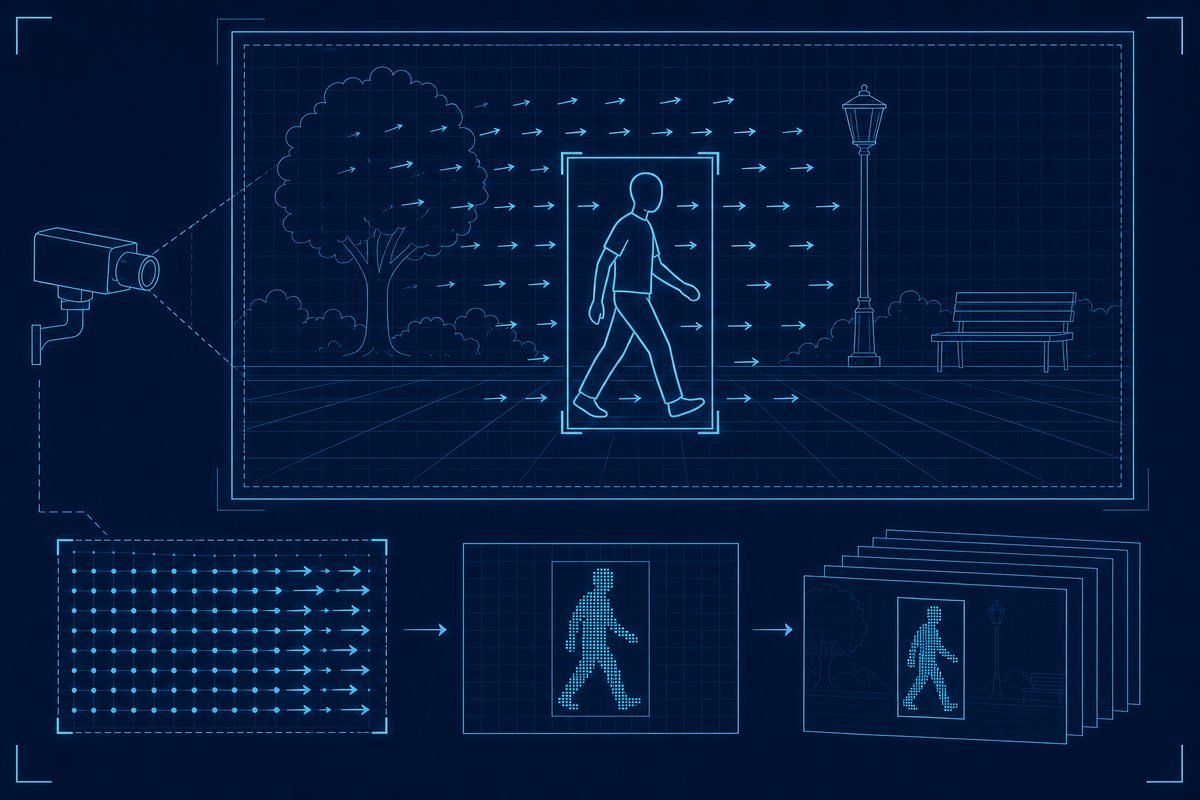
Background subtraction tells you where something changed. It does not tell you how it moved. For that you need optical flow, which estimates a small motion vector — a direction and speed — for regions of the image between consecutive frames. The output is a field of little arrows showing how the picture is flowing.
This is what you need the moment direction matters: tracking an object across a scene, counting people passing left-to-right versus right-to-left, distinguishing a car entering from a car leaving. Optical flow is computationally heavier and considerably more sensitive to noise than background subtraction, so the rule of thumb is simple: use background subtraction when you only need to know that something moved, and reach for optical flow when you need to know how.
The gotchas nobody prints in the abstract
Every one of the following has ambushed a real deployment, and none of them appear in the tidy version of the algorithm:
- Lighting. Auto-exposure, passing clouds and flickering lights create global brightness changes that masquerade as motion. Adaptive background models and working in a lighting-robust representation both help; a hard-coded threshold on raw brightness will not survive a single sunset.
- Camera shake. If the camera itself moves — wind on a pole, a bumped tripod — then everything moves relative to the frame, and a naive detector reports the entire scene as active. Either mechanically stabilise the camera or digitally stabilise the footage before detection, or you'll drown in false positives.
- Repetitive motion. Swaying trees, rippling water, a flapping flag, an escalator. These move constantly but mean nothing. A per-pixel model that learns “this location flickers normally” is the standard defence.
- Shadows. A moving object drags a moving shadow, and the shadow gets flagged as part of the object — inflating its apparent size and merging two people who walk close together into one blob. Dedicated shadow-suppression steps exist precisely because this problem is so common.
A minimal honest pipeline
Put the pieces together and a realistic detector looks like this: grab a frame → convert to grayscale to cut the data and the noise → update the background model → compute the foreground mask (the pixels that deviate) → clean the mask with morphological opening and closing to remove speckle and fill holes → find connected regions and discard anything smaller than a sensible size threshold → draw boxes around what survives. If direction matters, add optical flow on the surviving regions.
Notice how much of that pipeline is cleanup and judgement rather than clever mathematics. The morphology step, the size threshold, the background update rate — these unglamorous parameters are where a detector is actually won or lost. Two engineers using the identical algorithm will get wildly different results depending on how they tuned these for their specific camera and scene.
What to carry away
There is no “detect motion” button, and treating it as one is why so many first attempts fail in the field. There is a chain of modest decisions: what is the background, what counts as a meaningful change, does direction matter, and what specific noise will this camera in this scene throw at me. Get those answers right for your situation and the choice of core algorithm becomes almost an afterthought. Get them wrong and no algorithm, however sophisticated, will save you.
Found an error? Tell us — corrections improve the register.